2012-09-28
Presenting the Azure Drawing Recorder
Well, it's been a while since I've posted here, so it's about time I had something interesting to report! First of all I'm afraid over the last 3 months my blog gathered over 30 000 spam messages. This made it impossible for me to reasonably deal with them, and filter out useful comments. I've had to delete all comments, including possibly well-intended ones. I've since added a captcha and additional anti-spam measures, so things should be better now!
On to what this post is all about, a little over two months ago we had the Skia team visit us in the Toronto office. While there they showed us some of the neat things they're doing with Skia, and one of the things they were doing looked pretty cool! Essentially it was a tool that could take a recorded drawing stream and inspect it, it really made me feel like a powerful debugging tool for drawing sequences could help us out as well. We already have some of these tools already in the 3D drawing area (think of OpenGL APITrace or DirectX's PIXWin (soon to be the Visual Studio Graphics Debugger), however the calls seen there can be pretty hard to correlate with 2D drawing instructions due to batching and other mechanisms.
So this is what I started working on. Since Azure didn't have any recording functionality yet I had to add that first, that's mostly done now and that work is landed in nightly. As a result nightly can now produce recorded drawing streams. The way in which these streams are produced is still a little bit constrained, the following limitations apply:
- You must be using Azure content drawing, that is currently Direct2D(accelerated) on Windows Vista+ only
- The 'gfx.2d.recording' pref must be added and set to 'true'
- After the browser is restarted -all- drawing will be recorded until closing
- The stream is always stored in the file 'browserrecording.aer' in the current working directory
- Storing everything means storing all bitmaps drawn, and all font truetype data, this can make the file grow big, currently no compression is used
- It may crash when webfonts are used
These are issues we aim to fix in the future, some are easier to fix than others, so look for updates on this. For now, if you have a machine that's capable of Direct2D you can add the 'gfx.2d.recording' pref and set it to true to enable it when you're curious about how we're drawing a certain site. You can then go to the site you want to know more about and close the browser. Your working directory will now contain the 'browserrecording.aer' file (rename/move this if you don't want it to be overwritten next run!).
As this file is stored in a binary format, in itself this isn't actually very useful to you! This is why I've also created a simple debugger. This is in the early stages of development, its UI is not great, nor very intuitive, and functionality is limited at this point. Although it should prove sufficient to be useful for debugging certain types of graphics bugs. I built it on top of Qt and the source code is available here. You can currently find a stand-alone build here, and you might also need the new VS2012 redistributables available here. To make it a little easier to explain, let's start with a screenshot of the main interface.
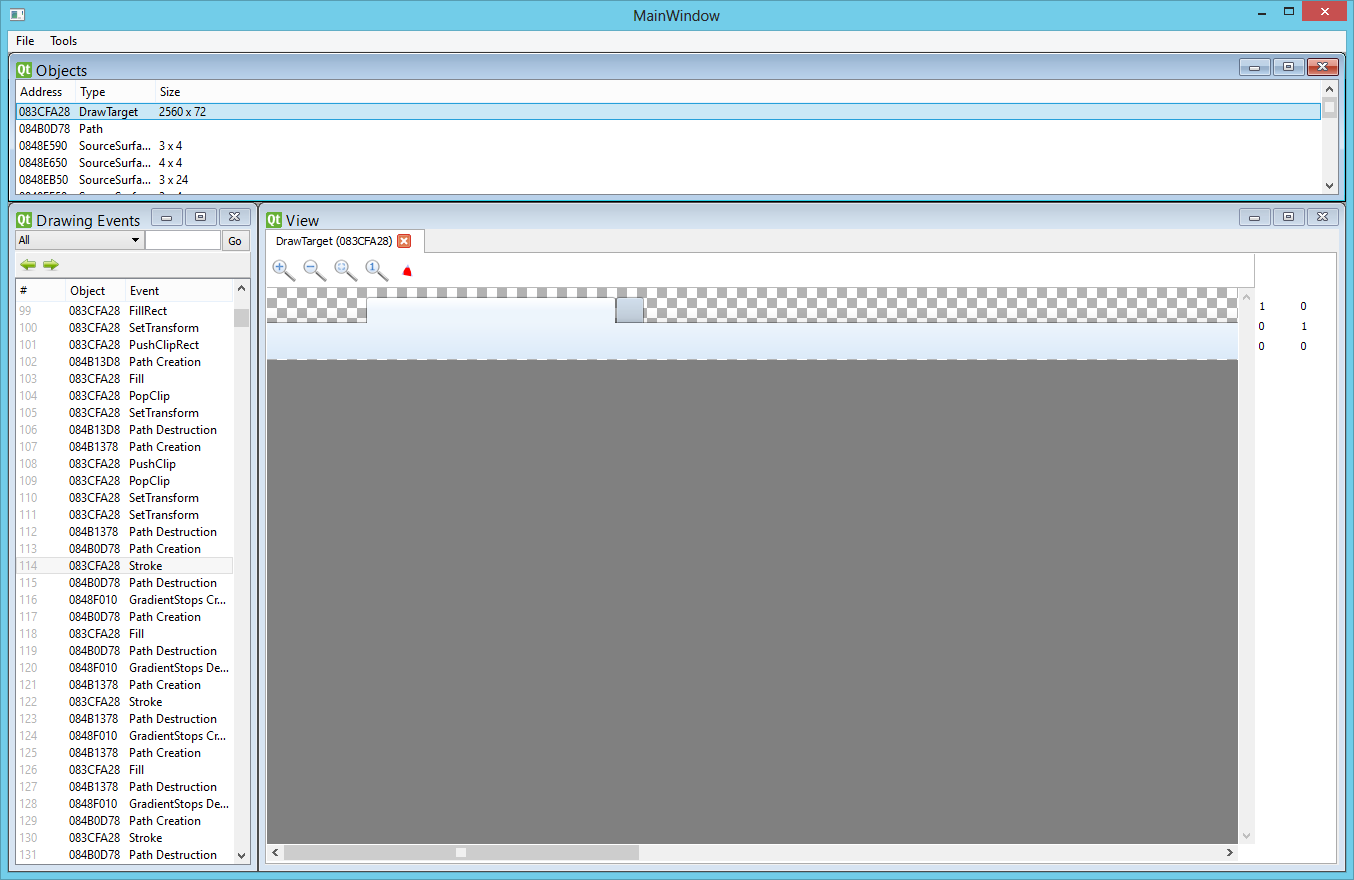
Now I'll proceed to explain what's currently available in the interface, this might be somewhat lengthy, so if you were just here for the cool pictures feel free to browse on! It might also require some very basic Azure knowledge. I should follow up at some point with a blog post explaining some of the basic terminology.
There's currently three distinct areas in the player:
Drawing Events
The Drawing Events area to the left represents the drawing events present in this stream, clicking any drawing event in there will replay drawing to the corresponding point in the stream. Keep in mind here that moving forward in time is faster than moving backward, when moving forward we only need to execute the 'new' drawing commands, whereas when moving backward we need to replay from the start (a drawing command can't really be 'removed'). This might be fixable in the future by storing 'keyframes' every so many drawing events.
In the columns you will see the current drawing event 'ID' (its position in the sequence), the 'object' that drawing call applies to (in case of object creation or destruction the object that was created/destroyed, otherwise the DrawTarget a drawing call executed on), and the type of drawing event.
In the top there's a text input, which allows you to jump directly to a certain drawing event 'ID', as well as back/forward buttons to jump through events you've recently visited, and a dropdown box which allows you to filter on events coming from a specific object.
Objects
This is the list of objects alive at the currently selected point in the drawing stream. Asides from being useful in debugging lifetime issues and showing some (currently very rudimentary) information about the objects listed this can be used to do a number of other things. One of those things is that you can double click several types of objects to open them in the 'View' area, which I'll explain more about later. In addition to that an object can be right-clicked in order to filter the Drawing Events list based on that object.
View
In this area relevant information can be viewed on an object. In the screenshot shown above we're currently showing the DrawTarget where the UI is being drawn at this point in time. We can do the obvious zooming and in and out of DrawTargets and SourceSurfaces. In addition to that for DrawTargets we display the currently set transform to the right, as well as there being a switchable button at the top that will visualize the currently set clip (it will illuminate it in bright red!). This area, just as the objects area is live and what is shown here will update as you navigate through the drawing events.
So that about covers the basics! Under 'Tools' there is an experimental feature called 'redundancy analysis', that is currently very experimental, if you do decide to play with it keep in mind it will corrupt the heap of the player :-)! Once I've worked on this a little more I will talk about it in a follow up blogpost. Again, this is all in a very early stage and suggestions and contributions are all very welcome!
But this is all windows-only :(
That's true! Currently the recording side of things, that is present on mozilla-central is available everywhere if you force Azure content on, on those platforms, however fonts currently do not work outside of windows, and Azure content is not yet ready to be used for browsing yet on non-windows platforms. The player however is currently only available on windows. Although it has been developed based on Qt and should work on other platforms, it uses the Azure stand-alone build which currently only has a Visual Studio project file and only supports Direct2D.
I'm very interested in having the stand-alone library and test-suite supported on other platforms, and as such if you want to help out in this area please let me know! I'll be more than happy to provide more detailed instructions and help out.
That's all for now! I have a lot of other ideas to work out with the new recording system, I'll hopefully be able to cover more of those here in the near future.
15 comments
Neat. My experience with these sort of record/replay tools is that they are massive time savers, as they server multiple duty: debugging, regression testing/comparison, etc. And the more layers we intercept the better, as issues don’t confine themselves to one layer.
I don’t think that Pix / VS 11 supports Direct2D yet. FWIW, some time ago I attempted to add Direct2D support to ApiTrace, https://github.com/apitrace/apitrace/tree/d2d . It’s incomplete and there are some challenges in finishing it: D2D API is used with DWrite so actually we need to intercept two DLLs (d2d1.dll and dwrite.dll); and the API itself has callbacks (interfaces that are supposed to be implemented by the application), which are hard to trace/retrace. But it’s not impossible.
Any chance this might’ve affected rendering performance on Linux? I’ve noticed the occasional “ghosting” when scrolling, and when animation events happen in the tab bar and when scrolling, and reflowing the content area.
Any ideas/pointers on how to debug the above?
Azure content on, on those platforms, however fonts currently do not work outside of windows
Just curious, in what way are fonts not working? I’ve been running with Azure content on under Linux and the only problem I’ve noticed, before the crashing that started happening about a week ago, is that select lists sometimes fails to draw/popup when clicked.
Does it fall back to an alternative renderer specifically for fonts?
@Jose: Interesting VS2012 -claims- to have support but I haven’t tried it yet. Their 3D debugging interface certainly seems to have improved since PIXWin.
@Kim: With the switch turned off it should not affect Linux at all. I have no clear advice on how to debug those issues to be honest. Please feel free to raise a bug and CC me on it, although I’m no expert on how we work on linux. As for the problem of fonts, at this point the Azure ScaledFont classes used on Linux don’t support the GetFontData function yet. Which means the recording cannot save the truetype information, and the player cannot replay font drawing. Live font drawing should not be affected.
I think the question on many peoples’ minds is,
Using this tool, have you found something that needs to be fixed / improved?
@Alex: A fair question! The very first thing I found was a problem with GMail drawing: https://bugzilla.mozilla.org/show_bug.cgi?id=788877 This was actually pretty had and has been fixed and the patch is uplifted.
Something else I found when playing around is:
https://bugzilla.mozilla.org/show_bug.cgi?id=791841
The list gets a little longer, but these should be good examples :-)
Now I’m actually working on debugging some issues with my latest patch where I’m actively using the tool to debug my patch.
Looks like a great tool! My experience so far, might help others:
1. Since recording goes to current directory, if you’re running a Nightly installed in its usual place (Program Files), you will need to run Nightly with “run as administrator” option. Otherwise it will have no permissions to write the file.
2. If you’re getting very tiny (~300 bytes) recordings, it’s because D2D is switched off. My very-recent Catalyst driver turned out to be blacklisted for some reason.
3. Now, a problem I can’t solve: after loading the complete recording file (I think?), I have a bunch of events in “Drawing Events” window, some objects on Objects window, and a nothing in “View” window. What do I do for “View” to show something?
Thanks! :)
@sysKin: Double click a DrawTarget or other type of object in the Objects window! :)
@sysKin: One more thing, as I was debugging an issue using the player yesterday I found a couple of bugs and added a tiny bit of functionality in the form of an Event Information window. The new build is on my people, you may want to update, it’s backward compatible with your trace.
This is great. I really like the direction in which firefox development is heading with all those performance debugging tools.
There are some questions that occurred to me after playing with it a few minutes
1. Is it really necessary to save all those raster images in the file? Is there something interesting about what the pixels exactly look like?
2. What is the deal with SetTransforms? They seem pretty redundant or expendable to me in many cases.
3. Would it be possible to include some performance information that allows it to identify the drawing hotspots more easily?
@Kamulos: Thanks for your feedback! Let me answer your questions:
1. I think so, I’d prefer actually compressing them, and I’m working on something like that, but knowing ‘what’ image is displayed can often give important contextual information, for example for lifetime debugging issues and such.
2. This is caused by how the Thebes-Azure wrapper uses the transform. Once code gets migrated to Azure this will become better. Measurements indicate they’re within the noise code-overhead wise, so I’m not too worried.
3. I’m working on this! Expect updates in the future!
Bas, MS has an update for Win7’s Direct2D, DirectWrite and Direct3D.
http://blogs.msdn.com/b/chuckw/archive/2012/11/14/directx-11-1-and-windows-7.aspx
http://support.microsoft.com/kb/2670838
“This update improves the features and performance of the following components”
http://www.microsoft.com/en-us/download/details.aspx?id=35661 says Pre-Release, so it’s not the final release, might not want to install this until the final release is out, don’t know when though.
Bas,
For some reason the recorder tool is not working on my Windows 7 x64 machine. I noticed severe checker-boarding when navigating between slides using the Up/Down arrow key in a Google Docs presentation. Here is a link to a presentation that demonstrates this symptom: https://docs.google.com/presentation/d/1uifwVYGNYTZDoGLyCb7sXa7g49mWNMW2gaWvMN5NLk8/edit?pli=1#slide=id.g1c2fc179_1_20
I will not have access to a 32-bit Win7 machine until the end of next week, so thought I should bring this link to your attention. Additionally, I updated a bug that reported similar symptoms in https://bugzilla.mozilla.org/show_bug.cgi?id=775320
Thanks,
Manoj
@Nvd: Yes, and there’s a lot of very promising stuff in there! I’m very excited about it.
@Manoj: We recently fixed a bunch of issues with the 64-bit version! Hopefully things will become better there. Unless this was a 32-bit build on an x64 machine, in which case it should be fine -if- the graphics section of about:support shows Azure content is enabled.
Final version of KB2670838 update released.
http://www.microsoft.com/en-us/download/details.aspx?id=36805
It causes font rendering issues though for some users.
http://msdn.microsoft.com/en-us/library/windows/apps/bg182880.aspx
“Windows 8.1 Preview introduces DirectX 11.2, which brings a host of new features to improve performance in your games and graphics apps.”
Bas, please test Win 8.1 Preview with Azure D2D.