27/10/09
Font Rendering: GDI versus DirectWrite
So, this is where I give my first blog post a shot. Let's see how it goes. So, I've been working for Mozilla on implementing DirectWrite as a Cairo and gfxFont backend, in order to investigate the differences, see bug 51642. DirectWrite is a new font rendering API that was released with Windows 7, and will be included in the Vista platform update for Windows Vista SP2. It offers a number of advantages over the old GDI font rendering system, which I will attempt to elaborate on. The main advantages that it has over GDI are:
- Sub-pixel shaping and rendering
- Bi-directional anti-aliasing. (GDI only supported horizontal anti-aliasing)
JDagget already has a nice post on CFF font rendering here. I'm hoping to give some additional information here.
First of all let's look at the W as found on the front page of the Mozilla Minefield start page:
| GDI | DirectWrite |
 |  |
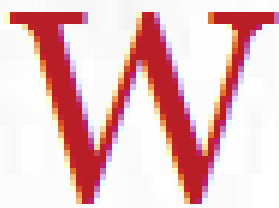 | 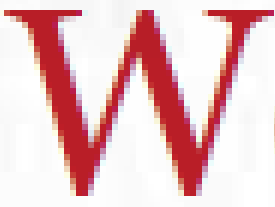 |
First of all it can be seen that the subpixel anti-aliasing is 'softer' in the DirectWrite version. Where in GDI the cleartype anti-aliasing introduces a fairly strong colorization (the left edge is clearly yellowish, the right side is clearly purple-ish), the DirectWrite version introduces a more natural color transition with the sub-pixel anti-aliasing.
Another difference that can be seen are the serifs at the top of the W, there the advantage of vertical anti-aliasing can clearly be seen, where in the GDI version the serif is really mostly a block of 2 pixels high, the vertical anti-aliasing in the DirectWrite version introduces the actual curve expected in a serif.
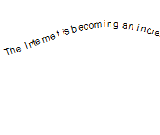
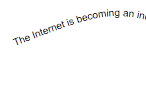
Another big advantage of using DirectWrite can clearly be seen when we look at transformed texts. The following are different transformation situations, comparing the results between DirectWrite and GDI:
| GDI | DirectWrite |
 |  |
 |  |
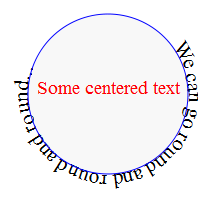 | 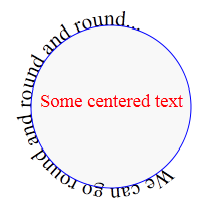 |
In the first example it can clearly be seen that GDI has clear aliasing and placement issues when rendering transformed fonts which DirectWrite doesn't suffer from. A displacement in the line of the 'B' from button can clearly be seen. Also the lack of vertical anti-aliasing is clearly visible in the transformed setting where the main lines of the font are diagonally placed.
The second image again illustrates the improved subpixel anti-aliasing performance in DirectWrite. The DirectWrite case looks quite good, whereas in the GDI case the text is barely legible. The anti-aliasing issues GDI has here are clearly visible in the i in 'becoming' where it actually shows as a red letter because of inaccurate sub-pixel usage. Additionally several lines and curves of the letters are simply not visible in the GDI case.
The last image in this series shows another interesting property. The most notable effect in this image is the pixel snapping occuring on the letters by GDI. It can clearly be seen that the letters are snapped to whole pixels on the circle. Where in the case of untransformed text the baseline is completely aligned on pixels, this is not a big issue. In the case of the circular baseline, this means the 'O' of the second case of 'round' actually floats above the line, and the 'e' in the first 'We' is actually floating above the baseline. In the DirectWrite version the benefit of the subpixel positioning can clearly be seen as the text is nicely aligned along the circle.
The advantages of subpixel positioning are not limited to transformed text though, below is an example of how subpixel positioning can improve the kerning of text.
| GDI | DirectWrite |
 |  |
In the GDI example it is clear that the spacing between the E and the V is rather odd. You can see this effect if you go to the Mozilla website and slowly, pixel by pixel, decrease the horizontal size of the window. You can see the letters 'dance around' with respect to eachother as each individual glyph's origin gets snapped to a vertical pixel row. When using DirectWrite, subpixel placement means the glyphs are spaced identically at all window sizes.
The final screenshots I'd like to show are a general look at the browser UI:


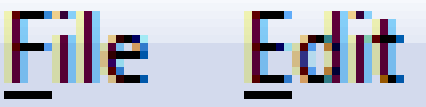
Now this is where DirectWrite arguably does not perform better. The DirectWrite UI clearly looks 'lighter' than the GDI UI. And although the curves and letters are smoother. At the font size and DPI in the situation of the screenshots it is likely very personal as to which one you feel is better. One advantage that DirectWrite does have is the superior subpixel anti-aliasing again. In the GDI example there's clear colorization at the horizontal boundaries of the lines. DirectWrite does not suffer from this, a final image illustrates this:

I hope I've given everybody reading this a bit of an idea of the quality differences between GDI and DirectWrite. The last point I'd like to mention briefly is performance. The current implementation primarily uses draws to a Direct2D surface created using CreateDCRenderTarget, this means that for every font operation, Direct2D will rebind the DC render target to a GDI surface. For a DCRenderTarget Direct2D internally does as much hardware acceleration as possible, and then blits that surface to the software GDI surface when done. As a fallback it can draw to a DirectWrite GDI interop surface. But this codepath should usually not be used.
When using the Direct2D method performance at the moment is slightly worse than in GDI. Interestingly enough CPU usage does not saturate when actively continuously re-rendering fonts, this is most likely due to the font rendering blocking waiting for hardware rendering operations to finish. Making the rendering thread regularly relinguish some of its time slice as it starts waiting for the display hardware. Part of the decrease in performance can probably be attributed to the fact DirectWrite simply does more work that GDI does. Should certain features be disabled it will probably perform better. Additionally a more clever way should be devised to manage the D2D surfaces, in theory each gfxWindowsSurface could have a D2D DCRenderTarget, and keep hold of that, preventing the surface binding currently needed on every single font drawing operation.
Well, that's about it for this post. I hope my first attempt at this sort of post is an interesting read for everyone! I hope to be able to share more information in the near future. Oh, and before I forget! There's a try-server build that will use DirectWrite on Windows 7, feel free to try it on your favourite font stress-test!
18 comments
Fantastic to see Mozilla committed to DirectWrite. As Ethan Dunham (the FontSquirrel) points out, current ClearType rendering is the elephant in the room when it comes to @font-face:
http://www.fontsquirrel.com/blog/what-to-expect-from-our-font-face-generator
The sooner we get DirectWrite in browsers, the better! Thanks for working on it.
This article answered much of what I wanted to know about DWrite. Thanks!
The “colorization” that you claim cleartype is because of sub-pixel rendering. When you enlarge anything rendered with subpixels the colors look wrong. When displayed on a screen with the right sub-pixel order, this coloring will/should not be visible.
@Fredrik: You’re absolutely right, colorization of bordering pixels is fundamental to sub-pixel antialiasing, and it -should- not be visible, or atleast disturbing. The screenshots are intended to demonstrate DWrite lights up the neighbouring subpixels less aggressively, and this, atleast to my eyes, indeed realizes the intended effect. GDI however, to my eyes, does produce a colored glow on vertical font edges. Therefor, I personally feel the subpixel antialiasing in DWrite is superior to that in GDI.
In any case the none-zoomed menu bar is intended to demonstrate the horrible blue right edge the letters in GDI get.
Freetype 2, and therefore the tool “GDI++” surpasses both GDI and Direct Write.
This is too sad there is no option to use Freetype with Direct2D, it will be a regression for me, a GDI++ user.
Nice article. However, as nice as the article may be, doing some real tests using the server build you linked to at the end of your article revealed - to me at least - that the DWrite quality is currently far *inferior* when compared to my current FF 3.5.5 font rendering. Now, again to me, in the few pages i’ve bothered to test before closing “Mindfield” again, the text rendering lacked “substance", the fonts seemed “washed out” and a tad “blurry” - similar to the letter “H” of the menu entry “History” in your GDI vs DWrite comparison pictures (i wished you had provided a ‘zoomed in’ comparision of this area as well). Of course your milage might vary. I also noticed that most criticism of the ‘old GDI with Cleartype’ rendering comes from people who never even bothered fine-tuning their output - under Windows 7 (which I’m using), this is as simple as typing “cttune” into the search box of the start menu and hitting enter (alternatively, via Control Panel -> “Display” -> “Adjust ClearType text"). What follows is a wizard that subsquently asks you “What of the following looks better to you” questions - and then you’re done, often with huge, instantly visible improvements.
Ultimately, from an end user perspective, it doesn’t matter what the rendering technique used under the hood is called - what matters solely is the visual quality achieved. I hope you don’t fall for the buzzword trap and start implementing stuff just “because [insert competitors name here] has done it too". I’d even go as far to say that an end user could care less if rendering a page took 8 ms instead of 4 ms if the visible output is better - and to me, it currently looks like the GPU-accelerated solution favors speed and sacrifices quality. I’m also pretty confident that i won’t be encountering enough skewed HTML Button inscriptions, sinuously floating texts and circle-path-aligned phrases to justify switching over to the “new kid on the block".
The whole thing reminds me of the “encode videos on your GPU” buzz - which serves as a reminder of how crappy quality at 7x the speed will make people glance at first - and then make them move on in disgust; no matter how much you hype it.
@[CC]: Well, the important feature here is subpixel positioning. Opinions on how people think DirectWrite looks at the moment differ greatly per person. I might note I personally think in the UI I’d like the sharper GDI rendering, and in the page the DirectWrite rendering. DirectWrite can be tuned to render GDI style and all though, so I’m sure we can finetune it to how we like it. It’s good to get some feedback though, although DirectWrite gives no performance improvement with GDI, only with D2D. (just to clear up that misunderstanding :)) We’ve also changed a lot since the try server build in this post. I’ll try and post a new one sometime.
You might want to take a look at some of the things they did with D2D/WPF rendering for vs2010 to get the text clearer:
http://microsoftpdc.com/Sessions/CL09
“Colorization” which you get on GDI rendered ClearType is because of wrongly set gamma (probably default 1.4). If you download the ClearType Tuner PowerToy and set the gamma to 2.2 (which aproximates sRGB) then the text rendered by GDI will look much better.
Could be wrong, but it looks to me like the text rendered on the right was blended in a non-linear color space (e.g., SRGB) while the DirectWrite is probably correctly blended in linear RGB.
Lack of updates this week is because I’m at the all hands meeting of Mozilla :-). We have had a lot of good progress surrounding direct2d things as well though!
I also have to notice that GDI-rendered text simply looks better and more readable than DirectText-rendered text, which looks thin (especially the curves) and appears to contain slight noise. I hope they improve font rendering in IE9, because if it stays like this, I’m going elsewhere.
Not just UI text, but also text using the similar font size as UI text, which is pretty much all flowing text in, uh, blogs like this one and a whole lot of other places.
DirectWrite font rendering are ugly (too kerned!!), GDI fonts are much better!
How can I decrease the font kerning but keeping DirectWrite enabled for higher performance graphics?
Thank you
“arguably” does not perform better ?
How can it be argued? It’s lighter, fuzzier, doesn’t match the rest of the OS, and is flat out less readable than GDI.
I mean, I guess as long as the option to disable hardware accel remains it won’t be a big deal, but it seems like a shame to lose hardware accel and its associated benefits because the font rendering looks awful…
DirectWrite is a bunch of crap. Texts in Firefox 4 (rendered using DWrite) are unreadable. Can’t remember, when, for the last time, I was so angry.
I have to agree with the others here, Bas, but don’t take it personally, it is not your fault. The same lighter, noisier and a lot less smooth (imho) fonts are also visible on IE9. It is almost as if Microsoft is purposely going the opposite direction of Apple, that makes fonts look VERY smooth (they look like they’re all in bold). But as boring as MacOS font rendering is for some people (not for me), it is infinite times more readable than DirectWrite + D2D.
As far as ClearType I must say I love it. Calibri and Consolas both look absolutely amazing with it. I don’t see any colorization or any distracting effect on them. Personally I even prefer that combination over any MacOS font rendering.
By the way, the D2D font rendering improves a lot if you increase the size of the font. So whenever I am stuck with it (like in Firefox) I zoom in on almost every page. I can’t do that with the UI which I must admit looks absolutely horrible.
“Could be wrong, but it looks to me like the text rendered on the right was blended in a non-linear color space (e.g., SRGB) while the DirectWrite is probably correctly blended in linear RGB.”
Actually it is pretty much the other way around. While ClearType GDI is by default incorrect gamma, it can be fixed by disabling ClearType (making for a grayscale mode that’s always gamma-correct) or by selecting the gamma-correct picture in the ClearType Tuner (https://fontgammatest.netlify.com/cleartypeGDI-gamma.PNG). On the other hand, DirectWrite is not actually gamma correct, it always produces way too dark anti-aliasing shades for black on white text no matter what is done.
